An extremely useful Laser cutter upgrade
Like many modellers the acquisition of a laser cutter opened up a wide range of new projects however there were still a few limitations, the main one being the problem of double siding “etching”. Having devoured the seminal Chris Croft’s MRJ articles on wagon building being able to etch and cut thin plywood on the laser cutter has always been a target build for the laser cutter. However this requires being able to etch and cut out the wagon sides then turn the component over and laser etch the internal detail.Various solutions were tried with numerous alignment jigs and location systems, the newer open frame laser cutters being more problematical as they are just a X-Y plotter on legs with no integrated bed. Then last year I watched a video where the presenter suggested a user modification of fitting a laser crosshairs to aid alignment. This was the solution I was looking for and with the added satisfaction of using the laser cutter to produce the upgrade.
Overall design.
The modification is very simple, to fit a laser crosshair to the laser cutting head so that we can precisely locate the start of the cutting operation. The laser cutting software Lightburn has an option to define a laser cutting pointer offset. This allows us to align the laser crosshairs accurately on the work piece, the laser software will then move the laser cutting point to this offset before it starts cutting.
[ Figure-1 - General view of cross hairs fitted to the laser cutter ]
Parts Required
Very few parts are required, many I already had lying around.- A laser cross hair unit - search on eBay for “5v laser cross hair”, they can be obtained for less than £5, including postage.
- USB power supply, there is a USB socket on the laser cutter I could have probably used but I had a little mini power pack I could use, again eBay for less than £10 if required.
- 2mm MDF sheet to make the mounting cradle.
- USB cable to wire up the cross hairs
- Double sided adhesive pad or glue.

[ Figure-2 - components required for the cross hairs ]
Cross hair cradle
A few minutes was spent drawing out the cradle for the cross hairs, this was then cut out in 2mm MDF sheet and assembled with a little wood glue. [dxf file attached]
[ Figure-3 - CAD drawing of the comments to laser cut in 2mm MDF ]
One end of the USB cable was cut off and ground and +5v wires soldered to the laser cross hairs. The unit was assembled and stuck onto the side of the laser cutter head unit using a double sided adhesive pad. The position isn’t critical, just make sure it doesn’t interfere with the other wires when the laser head moves from side to side and place it so that the cross hairs are visible when working on the machine.
Calibrating the software
To calibrate the offset on a scrap piece of MDF sheet etch a square box shape, around 10-20mm square.
[Figure-4 - Etching a square box to set up the offset calculation. ]
First this allows us to rotate the cross hairs so that they align with the X-Y axis of the laser cutter, once aligned a drop of superglue in the cradle helps to hold them in position.
Second for the calibration align the cross hairs on the bottom lefthand corner of the box. On the laser settings use the options to cut selected graphics using the selection origin.
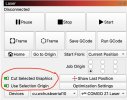
[ Figure-5 - Lightburn settings cutting selected graphics and selection origin ]
Then laser etch the box a second time. Using a ruler or vernier calipers measure the X and Y distance from bottom left corner of the second box to the same corner of the first box. Accuracy isn’t vital as we can fine tune it later. In my case the laser crosshairs are mounted to the left and rear of the laser head so the offset in this case measured as X = -46.5mm and Y = +21.0mm.
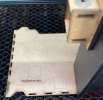
[ Figure-6 - Second box etched after aligning the cross hairs on the first box ]
On the device settings in Lightburn we enter this as the Laser Offset. Now for the fine tuning, turn on the option to enable the laser offset and etch the box for a third time. If the dimensions are perfect then the two boxes will align perfectly. My dimensions were slightly out, but tweaking the X offset to -41.65mm perfected the alignment. As indicated it can take half a dozen tweaks to fine tune the alignment.
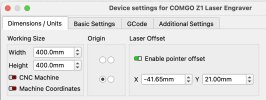
[ Figure-7 - Lightburn settings to define the Laser Offset ]

[ Figure-8 - Several fine tuning efforts to align the two etched boxes ]
Ready to roll
First benefit : Will it fit? When you have a component to cut out and you find a suitable off cut of material. No longer the dilemma of is the offcut big enough or trying to set up the alignment in the laser cutter. Simply turn on the cross hairs and use the Frame option in Lightburn. The laser cross hairs will trace out the frame required to cut out the item so you can check that they remain on the work piece. If the cross hairs drift off the workpiece you can then adjust it appropriately.
[ Figure-9 - Lightburn options to trace out cutting frame ]
Second benefit : double sided etching. This was the aim of the project. I drew out the wagon side with etching for the planking and location marks for the platework and strapping.

[ Figure-10 - Laser cutting and etching wagon side in 1.5mm plywood ]
We can then turn over the wagon side and now etch the interior planking. Use the frame check to check alignment, making sure the outside cut lines are selected so that the frame check matches on size. On the cut settings we then turn the output off for the cut line.

[ Figure-11 - Select the cut line to generate the frame but turn off the output ]
and we can etch the inside detail perfectly aligned.

[ Figure-12 - Wagon side showing the etched planks on the inside ]
The final stage of the wagon building has been to apply the POW lettering, initially I tried etching the lettering as a guide when cutting out the side. Unfortunately it wasn’t that successful as the when I filled out the letters the colour bled into the sides and wasn’t very sharp. Now I’m currently experimenting with cutting out a letter free wagon side, then applying sanding sealer followed by a couple of coats of base colour.
Once dry I can then put the wagon side back in the laser cutter and using the laser crosshairs align it to etch the letters into the base coat paint.
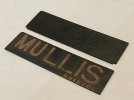
[ Figure-13 - Painted wagon side followed by etched lettering for painting ]
[ps. For @daifly - yes this has been submitted to the Scale7 editor for consideration in the Scale7 Newsletter. ]