
You are using an out of date browser. It may not display this or other websites correctly.
You should upgrade or use an alternative browser.
You should upgrade or use an alternative browser.
3D Printing - whether to buy, what to buy and how to use it?
That's often explained by differences in printing speed caused by the head slowing down for overhangs, eg the strapping and bolt heads. Occasionally when quality is important I'll dive into the settings and set every speed to the lowest speed in the settings chosen.I have been getting vertical "corrugations" which as far as I can make out is "chatter" from which ever axis step motor isn't moving at that time
Another issue can be vibration on changes of head direction when printing fast. There are calibration routines to tune this, Bambu printer have a auto tune function as standard.
Generally I prefer to break designs down so they all print on the horizontal as that tends to make surface details crisper. Maybe not so easy for this design when you have detail on the inner faces though.

simond
Western Thunderer
Toolbox for the X2D toolkit. This is one of a million free downloads of variable utility available on the Bambu site.
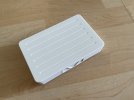
PLA, 0.4 (standard) nozzle. It took about 4 hours to print the three parts all in default settings.
I can see the lid and clip being re-used, and alternative bases being designed to suit other sets of tools. This or another of the available designs.
I think it did tell me how much filament it used, but I didn't make a note. It weighs 180g so I guess about £2.30, not “cheap”, but given a specific toolset, and will be used hopefully for years, probably quite good value.
This also suggests that the modelling uses (eg timber wagons) will be quite economical. It’s never going to replace resin, but I’m sure there are applications for which it’s much more appropriate, Templot COT track being high on my list.

best
Simon
PLA, 0.4 (standard) nozzle. It took about 4 hours to print the three parts all in default settings.
I can see the lid and clip being re-used, and alternative bases being designed to suit other sets of tools. This or another of the available designs.
I think it did tell me how much filament it used, but I didn't make a note. It weighs 180g so I guess about £2.30, not “cheap”, but given a specific toolset, and will be used hopefully for years, probably quite good value.
This also suggests that the modelling uses (eg timber wagons) will be quite economical. It’s never going to replace resin, but I’m sure there are applications for which it’s much more appropriate, Templot COT track being high on my list.
best
Simon

Rob R
Western Thunderer
This seems to be different to the "speed change" issue, I will try and get a photo but it is a regular, constant pitch vertical line, on all 8 faces. My sons printer (same model) has the same issue.That's often explained by differences in printing speed caused by the head slowing down for overhangs, eg the strapping and bolt heads. Occasionally when quality is important I'll dive into the settings and set every speed to the lowest speed in the settings chosen.
simond
Western Thunderer
As promised, report on the first model print. It would be a little too negative to suggest it’s a curate’s egg, but there is clearly room for improvement.
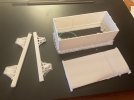
The wagon floor partially unstuck itself from the build plate, so is entirely scrap.
The hinges for the door end likewise did not print, but I think that is at least in part my incompetence rather than any fault of the process.
The rivet detail on the body seems excellent, and I’m struggling to see any layering at all.

It has to be said that white on white is difficult to photograph. There are some bits of fluff in parts, mostly where the support was, and easy to remove. I shall print the next one with the hinges separate, and as they won’t be in the way, I can print it upside down, which will avoid the support, I think.

I’m not sure quite why the slicer added support to the solebars - I wonder if they were not actually properly flat on the build plate as there is a layering effect on the outside which should not have happened. This has rather messed up the inside faces, but the outside detail is really pretty good, I don’t think anyone would complain at these axleboxes and springs, particularly for a “layout model”

So far, so good. The faults are all resolvable, and the process is much less messy than resin, and of course, the resultant parts are much more robust. Around 50g of PLA using an 0.2 nozzle. It took nearly 8 hours (but I was doing other stuff, so who cares?), but the wagon body, floor and solebars used less than £1 of filament.
The next stage is uncharted territory…. I’m going to try to print buffers, coupling hook and wheels in ABS on the basis that they don’t actually need to be metal. I’ll use piano wire for the axles but will print the waisted shape of an RCH axle.
I have not yet sorted the details but printed-in-place springing for axles and buffers should be feasible. Maybe even printed axle bearings. I’d like an RCH 7-plank wagon for well under a fiver, and I’m confident that it’s possible.
And thinking back to my MICA project, I think a 7mm clone of the old Peco Wonderful Wagons, with a printed, laser-cut card body on a 3DP body former and chassis is probably easier than it was.
Further developments to follow on my workbench thread.
best
Simon
The wagon floor partially unstuck itself from the build plate, so is entirely scrap.
The hinges for the door end likewise did not print, but I think that is at least in part my incompetence rather than any fault of the process.
The rivet detail on the body seems excellent, and I’m struggling to see any layering at all.
It has to be said that white on white is difficult to photograph. There are some bits of fluff in parts, mostly where the support was, and easy to remove. I shall print the next one with the hinges separate, and as they won’t be in the way, I can print it upside down, which will avoid the support, I think.
I’m not sure quite why the slicer added support to the solebars - I wonder if they were not actually properly flat on the build plate as there is a layering effect on the outside which should not have happened. This has rather messed up the inside faces, but the outside detail is really pretty good, I don’t think anyone would complain at these axleboxes and springs, particularly for a “layout model”
So far, so good. The faults are all resolvable, and the process is much less messy than resin, and of course, the resultant parts are much more robust. Around 50g of PLA using an 0.2 nozzle. It took nearly 8 hours (but I was doing other stuff, so who cares?), but the wagon body, floor and solebars used less than £1 of filament.
The next stage is uncharted territory…. I’m going to try to print buffers, coupling hook and wheels in ABS on the basis that they don’t actually need to be metal. I’ll use piano wire for the axles but will print the waisted shape of an RCH axle.
I have not yet sorted the details but printed-in-place springing for axles and buffers should be feasible. Maybe even printed axle bearings. I’d like an RCH 7-plank wagon for well under a fiver, and I’m confident that it’s possible.
And thinking back to my MICA project, I think a 7mm clone of the old Peco Wonderful Wagons, with a printed, laser-cut card body on a 3DP body former and chassis is probably easier than it was.
Further developments to follow on my workbench thread.
best
Simon
simond
Western Thunderer
Hi Rob,
all my own work!
I’m lucky enough to have Solidworks experience, and a licence, for my work and can use it at home as I wish.
Following @adrian suggestion, I’ve been looking at FreeCAD on the basis that when I retire, my employers might not be quite so generous! There are non commercial Solidworks licences available at reasonable cost, but I’m not sure if they can actually open models generated on the commercial licence. A question to ask, I guess.
best
Simon
all my own work!
I’m lucky enough to have Solidworks experience, and a licence, for my work and can use it at home as I wish.
Following @adrian suggestion, I’ve been looking at FreeCAD on the basis that when I retire, my employers might not be quite so generous! There are non commercial Solidworks licences available at reasonable cost, but I’m not sure if they can actually open models generated on the commercial licence. A question to ask, I guess.
best
Simon

simond
Western Thunderer
Probably, but I haven’t got that far yet. No panic!Simon,
Is it worth trying to open one of your already created files in FreeCAD, to see if the files are compatible with that?
It can't be overstated enough that there are two main causes of print failure in FDM printing; The build plate not being clean and the filament not being dry.The wagon floor partially unstuck itself from the build plate, so is entirely scrap.
.....
There are some bits of fluff in parts, mostly where the support was, and easy to remove
Bambu are specific NOT to use IPA to clean the build plate, but just use soap and water on their PEI plates.
I use Palmolive unperfumed hand soap, lathered up with a sponge and the plate well scrubbed, rinse and repeat, then dry with kitchen towel. In 1500hrs+ the few adhesion problems I've had have been down to being complacent and not cleaning the plate recently.
The small 'fluffy' bits sticking out are a classic example of filament not being dry enough. Even PLA straight out of the packet filament can be too wet and need drying. Other filaments are even worse. Not only will wet filament give poor surface finish, but it will also contibute to lack of plate adhesion.
A drier should be regarded as an essential accessory from day one. The cheap Sunlu ones work fine.
I'd master PLA first. Unless you need to use parts outdoors PLA is fine for just about every model part. The stronger ones like PLA+ and PLA 2 are likely to have all the strength you need without any of the difficulties of more exotic filaments.The next stage is uncharted territory…. I’m going to try to print buffers, coupling hook and wheels in ABS on the basis that they don’t actually need to be metal.
simond
Western Thunderer
Thanks Paul
I suspect the lack of adhesion was directly due to thumb prints. I shall wash the plate after work tonight. That's the first lesson learned.
I have the Bambu AMS, which is also a drier - the humidity was 27% when I last looked, perhaps this is still too much. The fluffy bits in my wagon's case were mostly where it was extruding onto empty air, which never ends well!
We have two Bambus at work and we are pretty successful with them using a variety of materials including ABS. I'm not too worried about strength but stiffness and surface hardness are unlikely to be good enough for wheels and buffers with PLA.
And I discovered that the Bambu needs both print heads to be the same size - I guess in retrospect, that is blindingly obvious, but it wasn't when I ordered the extra print head on the special deal with the new printer. I shall order the second 0.2 head today, and try not to grimace too much when I have to pay an extra fiver for it. I'll have to buy some more PLA as well.
I suspect the lack of adhesion was directly due to thumb prints. I shall wash the plate after work tonight. That's the first lesson learned.
I have the Bambu AMS, which is also a drier - the humidity was 27% when I last looked, perhaps this is still too much. The fluffy bits in my wagon's case were mostly where it was extruding onto empty air, which never ends well!
We have two Bambus at work and we are pretty successful with them using a variety of materials including ABS. I'm not too worried about strength but stiffness and surface hardness are unlikely to be good enough for wheels and buffers with PLA.
And I discovered that the Bambu needs both print heads to be the same size - I guess in retrospect, that is blindingly obvious, but it wasn't when I ordered the extra print head on the special deal with the new printer. I shall order the second 0.2 head today, and try not to grimace too much when I have to pay an extra fiver for it. I'll have to buy some more PLA as well.
I should have added the "Never touch the build plate surface .... EVER" rule ;-)I suspect the lack of adhesion was directly due to thumb prints.
Wet filament will continue to extrude more than expected, hence the 'fluffy' bits going away from the print.The fluffy bits in my wagon's case were mostly where it was extruding onto empty air,
Some people go through hoops of trying to change the retraction settings to solve this, but that will lead to other issues, so it just needs to be very dry.
I tend not to trust hygrometers as they measure the surrounding air, not the actual moisture content of the filament. Ten hours in a drier solves a lot of problems.

daifly
Western Thunderer
Following a recommendation on the Templot site, I now use a stick-type adhesive coating. Works extremely well.
Other options are available
Dave
Other options are available
Dave
Rob R
Western Thunderer
Managed to get a photo of unwanted vertical defects on my wagon prints.
Thiis one was done quite slowly (20mm/s), at higher print speeds they are less pronounced but we run into other issues.
When the current print is done I'm going to investigate the drive belts and pulleys, it is a low milage machine but that assumes that they tensioned them correctly in the first place....

MGWR open (upside down) in 1:64
Thiis one was done quite slowly (20mm/s), at higher print speeds they are less pronounced but we run into other issues.
When the current print is done I'm going to investigate the drive belts and pulleys, it is a low milage machine but that assumes that they tensioned them correctly in the first place....
MGWR open (upside down) in 1:64

martin_wynne
Western Thunderer
@simondI have the Bambu AMS, which is also a drier - the humidity was 27% when I last looked, perhaps this is still too much.
Hi Simon,
For fine detail with a 0.2mm nozzle ideally you need to get the RH below about 10%. Moisture in the filament creates steam pressure in the nozzle, causing the nozzle to ooze during travel moves -- leading to strings and fluffy bits. A faster travel speed helps, but the answer is drier filament.
Also moisture causes poor layer fusing, leading to weaker models. For Templot COT track this causes the chairs to break easily. With fully dried filament the chairs are very strong -- as good as injection-moulded plastic chairs.
Using the Bambu AMS 2 Pro I'm getting RH down to around 6%-8% with excellent printing results. That requires about 12 hours drying (even from new -- in fact the Bambu labels say dry before use, in the small print).
Then once dry you need some silica gel desiccant in there to keep it dry. I have printed this excellent set of desiccant baskets:
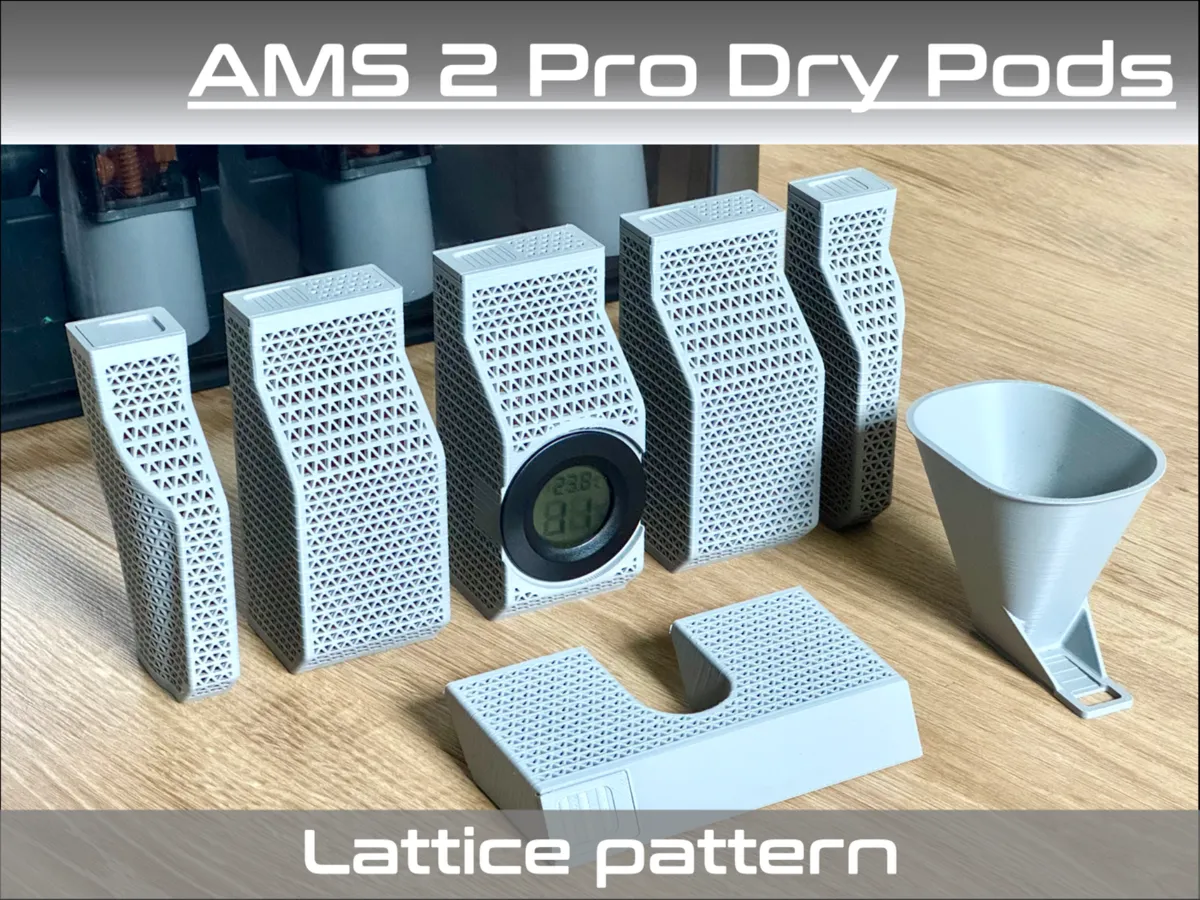
AMS 2 Pro Lattice Dry Pods - Free 3D Print Model - MakerWorld
Download this free 3D print file designed by dedge. IMPORTANT : This model is made for the AMS 2 Pro only My take on the very famous AMS dry pods… I do not pretend to have increased performances compared to other existing models, I just designed this kit myself as I did not like the look of...
 makerworld.com
Print them in PETG for better temperature resistance. The clip-on funnel for filling is brilliant if like me you have only two hands.

I use this orange desiccant in them -- it goes dark green when it needs re-activating:
The dryer gets the RH down to around 12%-15% at 45degC. Then the desiccant does the rest to below 10%. Don't leave the AMS lid open longer than necessary.
cheers,
Martin.
Last edited:
simond
Western Thunderer
Martin
thanks Martin, I did have a look last night and put it on to drying - it was down to around 17% this morning but seems to have gone up again, which is puzzling. It's idling now and I can't restart it from the office. I shall have a further look this evening.
Apparently it is possible to buy a separate power supply so it can be drying whilst printing. Not sure if that is a good idea or not.
I'll have a go at the basket, thanks for the link, and the technicolor dessicant too!
cheers
Simon
thanks Martin, I did have a look last night and put it on to drying - it was down to around 17% this morning but seems to have gone up again, which is puzzling. It's idling now and I can't restart it from the office. I shall have a further look this evening.
Apparently it is possible to buy a separate power supply so it can be drying whilst printing. Not sure if that is a good idea or not.
I'll have a go at the basket, thanks for the link, and the technicolor dessicant too!
cheers
Simon
martin_wynne
Western Thunderer
@simondApparently it is possible to buy a separate power supply so it can be drying whilst printing. Not sure if that is a good idea or not.
Hi Simon,
I have the Bambu A1, so the external power supply was needed for any drying. Drying while printing is a good idea -- just having warm more flexible filament allows it to feed more easily through the tubes. Unfortunately drying while printing doesn't work* on the A1, although you can print from an external cereal box while the AMS is in drying mode.
For the fastest drying you are supposed to unload the filament from the feeder and secure the free end to the side of the spool. The AMS then very slowly rotates the spool for more even drying -- that obviously prevents printing at the same time. I found that you need to secure the free end very neatly to prevent it catching anywhere. Especially with refills on home-printed spools.
*unless anyone knows different?
cheers,
Martin.
Last edited:
I’m not sure quite why the slicer added support to the solebars - I wonder if they were not actually properly flat on the build plate as there is a layering effect on the outside which should not have happened.
If you don't have supports enabled in BS (the default for some daft reason) it should put up a warning dialogue if there are unsupported areas that won't print correctly. I've found that similar to you sometimes for very small 'overhangs' like items not flat on the build plate there isn't enough volume for proper supports so they get omitted and prints aren't good. Sometimes just returning to the prepare page and hitting the keyboard shortcut F solves it (also the 'Lay on Face' button)
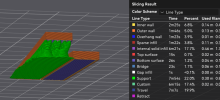
It's always worth using the 'color' option' for Line type in the Slicing results box on the preview tab once Bambu Studio has sliced the model. Supports will be indicated as a different colour. If you see those unexpectedly it's always worth investigating if parts aren't sitting as you hoped.
simond
Western Thunderer
Thanks Martin,@simond
Hi Simon,
I have the Bambu A1, so the external power supply was needed for any drying. Drying while printing is a good idea -- just having warm more flexible filament allows it to feed more easily through the tubes. Unfortunately drying while printing doesn't work* on the A1, although you can print from an external cereal box while the AMS is in drying mode.
For the fastest drying you are supposed to unload the filament from the feeder and secure the free end to the side of the spool. The AMS then very slowly rotates the spool for more even drying -- that obviously prevents printing at the same time. I found that you need to secure the free end very neatly to prevent it catching anywhere. Especially with refills on home-printed spools.
*unless anyone knows different?
cheers,
Martin.
Yes, this is what I did last night. It got down to 18%RH in 12 hours, and I’m going to kick off a print to see how it goes. It did the “rotating spools” thing but I’m sure it could have reduced the humidity more. Unfortunately you can’t control the AMS dryer from afar. I shall investigate the extra power supply, and a second 0.2 nozzle, and some more filament.
atb
Simon
Last edited: